

Airtable Case Study
Scaling Partner Operations
Role: Growth Specialist (Drive Specialist) | Timeline: 4 months | Platform: Airtable
At a glance
America's Thrift Stores needed to scale their Bags for Bucks donation drive program across schools, businesses, and nonprofits in multiple states—but their customer success operations had no centralized system. Partners were falling through the cracks, email outreach was inconsistent, and the team was drowning in manual work.
I designed and implemented a complete Airtable operations system that automated partner onboarding, standardized communication workflows, and gave leadership real-time visibility into the entire pipeline.
The Challenge
America's Thrift Stores runs donation drives with partner organizations—schools, businesses, nonprofits—who collect clothing donations to raise funds. Each drive requires careful coordination: confirming dates, sending welcome packets, collecting W-9s, scheduling bin placements, assigning Area Donation Logistics Managers (ADLMs), and maintaining communication throughout the drive lifecycle.
The problems I inherited:
No single source of truth. Partner information lived in email threads, spreadsheets, and people's memories
Inconsistent communication. Intro emails, welcome kits, and check-ins were sent manually—or not at all—depending on bandwidth
Zero pipeline visibility. Leadership couldn't see active drives, upcoming deadlines, or where partners were stuck
Manual onboarding for every partner. Setting up a new drive meant copying the same checklist from scratch each time
Data quality issues. Missing contact info, unclear statuses, and duplicate records made it impossible to trust the system
The stakes: The team was managing 50+ active partners across multiple states, with plans to scale further. Without operational infrastructure, growth would break the business.
My Approach
I came from hands-on operations work, so I didn't start with tools or layouts. I started by mapping how work actually flowed through the business—where decisions happened, where handoffs broke down, and where things fell apart under pressure.
Discovery & Workflow Mapping
I spent the first two weeks shadowing the team and documenting every step of the partner lifecycle:
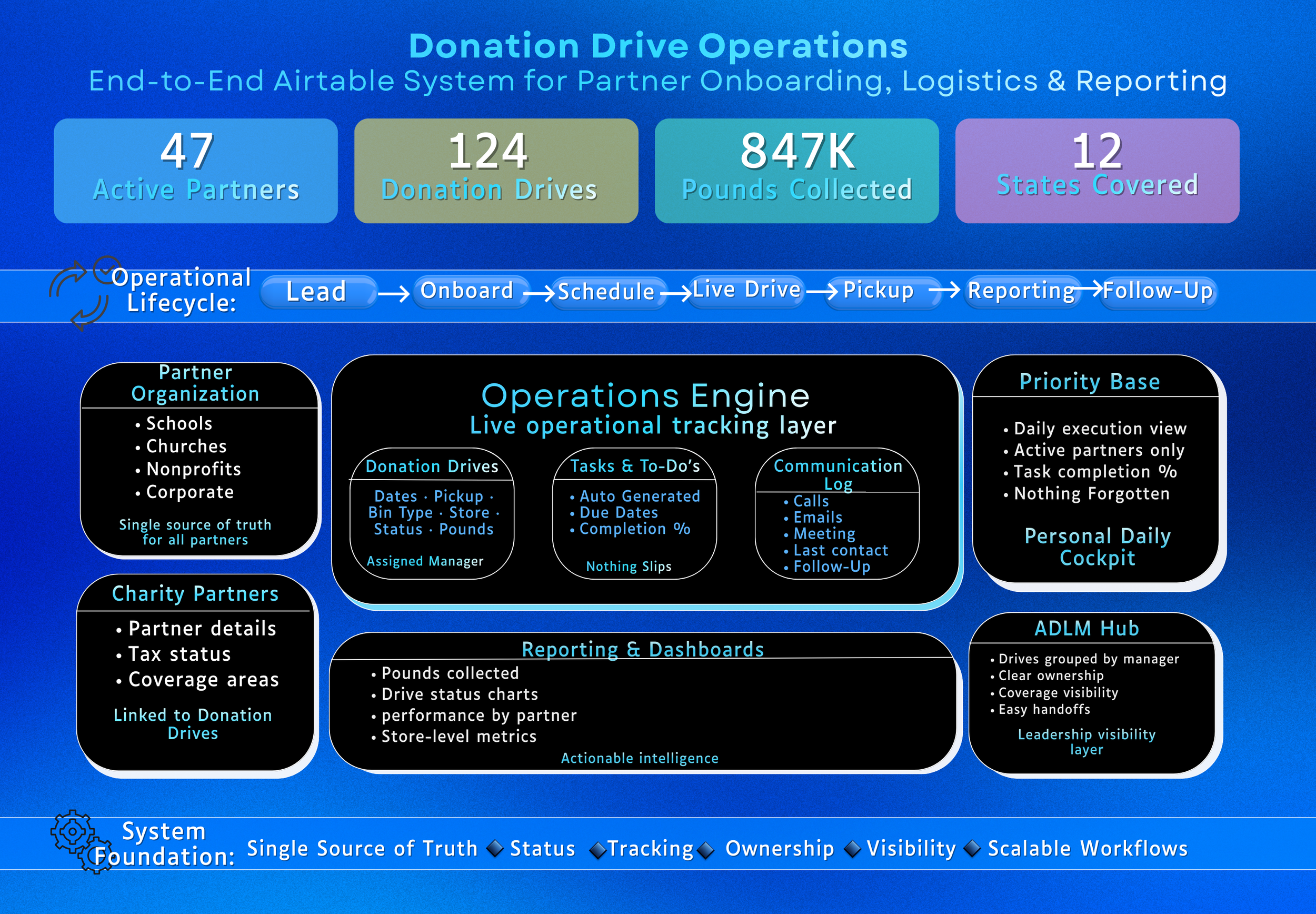
I identified five core operational phases:
Discovery/Prospecting – Initial outreach to potential partners
Scheduling – Confirming dates, logistics, and requirements
Onboarding – Welcome packets, W-9 collection, ADLM assignment
Drive Execution – Active support during the drive
Post-Drive & Renewal – Results reporting, thank-you, and rebooking
Each phase had specific triggers, required information, and communication touchpoints. The system needed to support the workflow, not replace human judgment.
System Design Principles
Clarity over complexity. Every page had a clear purpose and audience. No "kitchen sink" views.
Ownership built in. Status logic, assignment rules, and handoff points were visible at every level.
Designed for real use. The team needed to move fast—so I built shortcuts, one-click actions, and exception dashboards that surfaced what needed attention today.
What I Built
System Architecture
I designed a complete Airtable base with 4 core tables and 16 custom interface pages, each purpose-built for specific workflows:
Core Tables:
Organizations – Partner records with contacts, history, and relationship data
Drives – Individual donation drive records with dates, logistics, and status
Partner Tasks – Automatically generated checklists cloned from master templates
Communication Log – Timestamped record of all partner interactions
Interface Pages (16 Total)
I built role-specific interfaces so each user could see exactly what they needed:
Command & Control:
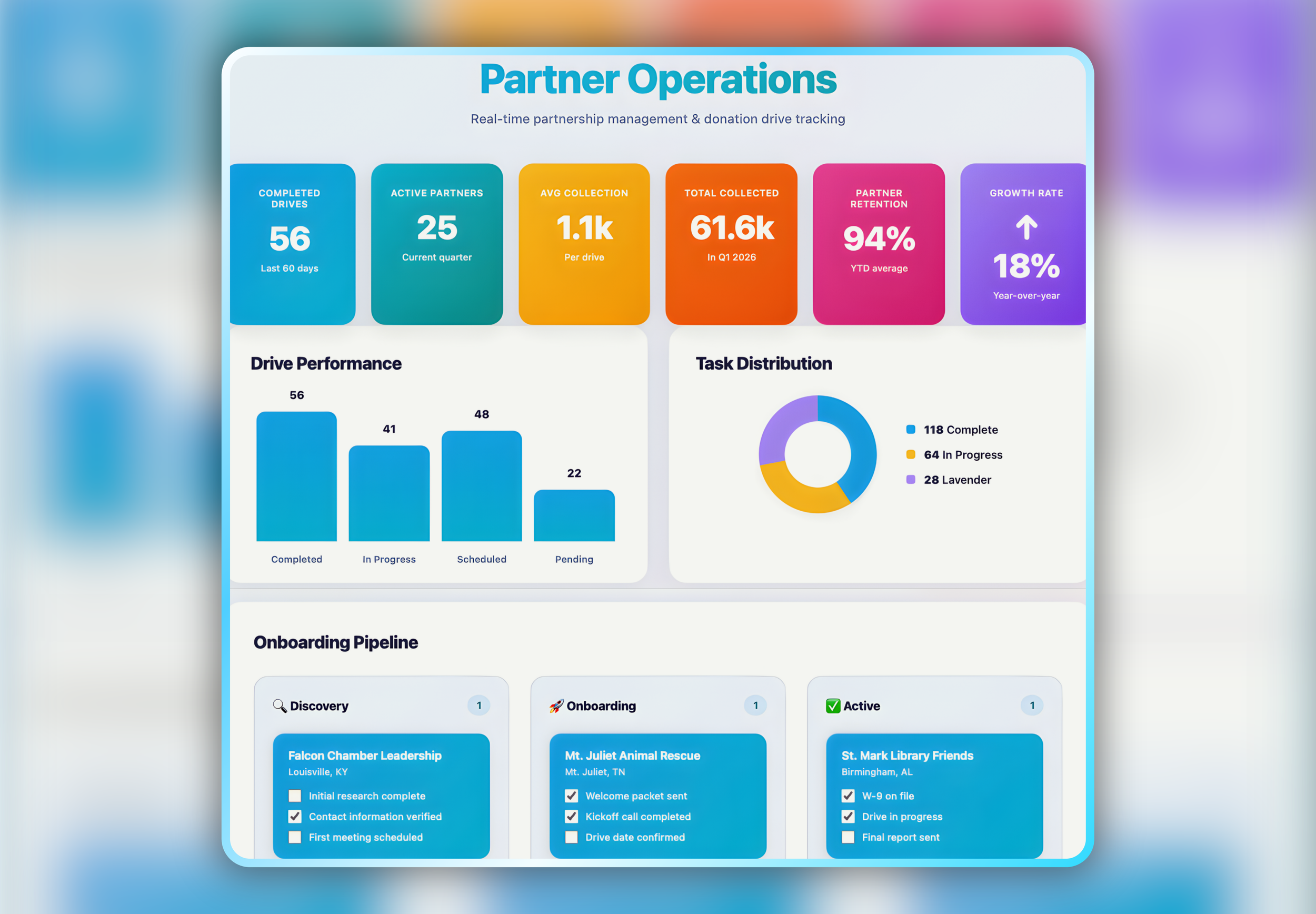
Dashboard – Bird's-eye metrics: active drives, upcoming deadlines, completion rates
Organizations Command Center (Priority) – Cockpit view for high-priority partners with embedded tasks, email buttons, and comm log
Daily Work Views:
Priority – Urgent tasks across all partner types, filtered to "what needs you today"
Priority: Schools – School-specific urgent queue (different requirements, W-9 workflows)
Most Recently Contacted – Prevents partners from being neglected
Drive Calendar and Dates – Timeline view for scheduling conflicts and capacity planning
Deep Work:
Organization Record Review – Single-partner magnifying glass showing all related tasks, contacts, notes, and comms
Onboarding Steps – Partner-specific checklists with progress tracking
Master Partner Checklist – Template library that clones into new partner tasks
Reference & Maintenance:
All Partners & Drives – Master phonebook for searching and data cleanup
Files & Template Viewing – Centralized library for PDFs, promo materials, and email templates
SOPs (Read-Only) – Clean process documentation for the team
SOPs – Editing – Working space for updating procedures
Email Editing – Template workshop for maintaining merge fields and copy
ADLM Hub – Who-does-what-where directory for routing and assignment
Kanban by Category – Drag-and-drop board for visual status management
Table of Contents and Page Descriptions – System map so users never feel lost
Automations: Making the System Run Itself
I built 15 automations that standardized communication and eliminated repetitive setup work.
Email Automations (15)
Send Intro Email – First outreach to new partners when record is created
Follow-Up: No Response – Automated nudge when no reply is received after intro
Follow-Up: Confirm Dates – Prompt for date confirmation X days after intro
Date Confirmation Request – Triggered when partner is interested but dates are missing
Date Confirmation – Official drive confirmation once all logistics are locked
Send Welcome Kit – Onboarding packet with PDFs and promo materials
W-9 Request (Initial) – Triggered when drive is confirmed and W-9 is missing
W-9 Reminder (Escalation) – Time-based nudge when paperwork is still missing close to drive start
Weekly Pre-Drive Check-Ins – Rolling check-ins during the lead-up period to confirm readiness and surface issues (automation-assisted with manual override)
Support Check-In – Final pre-drive reminder 7 days before start date
Schools Check-In (W-9 on file) – Tailored school communication when paperwork is complete
Schools Check-In (W-9 missing) – Separate nudge for missing tax forms
Pickup Reminder – Confirmation of access, bins, and contact details prior to pickup
Post-Drive Thank You – Immediate closeout message after drive completion
Results Email (Pounds Collected) – Automated impact and payout communication triggered when pound totals are entered
Key design decision: I used task-based triggers (Done = ✅ + Actions = [Email Type]) instead of pure time-based logic. This gave the team control over when automations fired while still removing the manual send work and preventing premature or incorrect sends.
Workflow Automations (6)
Priority → Auto Task List – When a partner is marked "Priority," the system clones the Master Partner Checklist into their record, sets due dates, and enables email buttons. This eliminated 15 minutes of setup per partner.
New Drive → Task Scaffold – Automatically generates baseline tasks when a drive is created or imported
Sync New Drives – Maps status, links ADLMs by coverage area, and creates initial tasks
ADLM Assignment Notification – Automatically notifies the correct ADLM when a drive is assigned
Status-Driven Enablement – Enables or disables actions and email buttons based on lifecycle stage
Pickup Logged → Closeout Workflow – Locks the drive, prepares reporting, and advances post-drive steps
Data Architecture & Status Logic
I redesigned the status taxonomy to match how work actually flows:
Old statuses: Vague, inconsistent (e.g., "Pending," "Follow-up," "Active?")
New statuses: Clear pipeline stages with defined entry/exit criteria
Discovery – Identified; initial outreach
Scheduling – Discussing dates; intro/plan meeting set
Needs ADLM / Logistics – Waiting on bin/pickup plan
Confirmed – Partner + ATS agreed on dates/details
Active (In Progress) – Drive dates underway; bins placed
Complete – Awaiting Weights/Payout – Drive ended; waiting on reporting
Closed – Paid – Pounds entered; payout issued
Deferred / Cancelled / Lost – Paused or not moving forward
Priority categories were separate from status, allowing for cross-cutting urgency:
Upcoming – Drive starting soon
Support – Active drive needing attention
Discovery – New partner in outreach phase
Pending – Waiting on external action
This two-axis system (Status × Priority) gave leadership visibility into both where partners are and what needs attention now.
Results & Impact
Quantitative Outcomes
✅ 16 custom interface pages designed and deployed
✅ 15 automated workflows eliminated repetitive communication and setup work
✅ 50+ active partners managed in a single base with full visibility
✅ 100% of partner onboarding checklists auto-generated (vs. manual setup previously)
✅ Zero missed follow-ups after system implementation
✅ Clean data – Standardized fields, duplicate removal, consistent comm logging
Qualitative Impact
For the customer success team:
"I don't have to remember what to send when anymore—the system tells me."
Morning routine went from "what am I forgetting?" to opening Priority view and working the list.
For leadership:
Real-time dashboard visibility into pipeline health
Confidence in scaling operations without adding headcount
Data-backed decisions on ADLM capacity and market expansion
For partners:
Consistent, professional communication at every stage
Faster onboarding and clearer expectations
Improved experience = higher renewal rates
Technical Highlights
Smart Interface Design
Every interface page had a clear "what/why/when" description:
Priority – what: the all-types urgent pile. why: hides the noise; shows only what needs you today. open when: you want the short to-do view.
This wasn't just user documentation—it was cognitive scaffolding that helped the team understand the system's logic and use it independently.
Exception-Driven Dashboards
I designed views that surfaced red flags automatically:
No dates yet (older than X days after intro)
Missing W-9 and drive < 14 days out
No ADLM assigned
No reply in 5 business days
Date changed in last 48 hours
This "Uh-Oh Board" concept meant problems got attention before they became crises.
Button-Triggered Workflows
Instead of hunting through menus, users could trigger emails, update statuses, and log communication with one-click buttons embedded in the Organization Record Review page.
Send Intro
Send Welcome Kit
Log Call
Mark Complete
Renewal Pipeline
I built a 6-month renewal cadence into the system:
Post-drive thank-you auto-sets Renewal Target = Drive End Date + 6 months
30 days before renewal target, system creates "Renewal Outreach" task
Keeps the relationship active without manual tracking
Lessons & Iteration
What Worked
Starting with workflow, not tools
Giving users control over automation timing
Building for exceptions, not just happy paths
What I'd Do Differently
Earlier training and documentation
More aggressive data cleanup upfront
Rollback safeguards on automations
Why This Project Matters for Your Business
This project demonstrates my ability to:
✅ Diagnose operational bottlenecks by observing how work really happens
✅ Design systems that scale (ready for 3× growth)
✅ Balance automation with human judgment
✅ Build for adoption
✅ Deliver measurable operational impact
Tools & Skills Demonstrated
Platform: Airtable (interfaces, automations, relational database design)
Skills:
Workflow analysis and process mapping
Database schema design and normalization
Automation logic and trigger design
Interface/UX design for operations teams
Status taxonomy and data governance
Change management and user adoption
SOP documentation and system training