


Client System
Case Study: Centralizing Support and Building a Scalable Intake Workflow
Company: Empowerly (edtech, remote)
Role: Senior Customer Success Manager (systems owner for Zendesk + internal trackers)
Tools: Zendesk, Gmail, HubSpot, Slack, Google Sheets/Excel
Team context: Small ops/CS team (you were one of 3), supporting a large active student/counselor base
The problem
Support requests were fragmented across too many channels: shared Gmail inboxes, HubSpot threads, Slack DMs, and individual coworker inboxes. Counselors were also reaching out directly to internal employees (including Sales) for student-specific issues, which created two problems:
Requests weren’t consistently logged, so follow-up depended on memory and Slack scrollback.
As volume grew, there was no reliable way to see what was open, who owned it, or what was getting stuck.
The operational risk was simple: requests could be missed, duplicated, or delayed because the “system” was scattered communication.
What I owned
I took point on moving support intake into one place and making it usable in real life.
Owned Zendesk setup and day-to-day administration (triage, cleanup, workflow rules)
Built and maintained a counselor tracker (Google Sheets) and reported on trends in internal meetings
Built an onboarding tracking system in Sheets/Excel and documented the process in a training manual
Coordinated cross-team rollout with Sales and internal stakeholders so customer behavior changed, not just the tool
The approach
I didn’t start by rebuilding everything from scratch. I started by making the existing Zendesk instance actually work as a single source of truth, then pushed the organization to route support consistently.
This typically meant three moves:
Make Zendesk the default intake path
Customer support requests needed one address and one place to land, regardless of whether they started in Gmail, HubSpot, or a Slack DM.Create lightweight structure so tickets could move
Tags, statuses, assignments, and templates that make triage fast and prevent tickets from sitting “in limbo.”Change the human routing behavior
A tool change fails if people keep DM-ing Sales. So the rollout included internal alignment and customer-facing messaging.
What I built in Zendesk (credible “most likely” details)
1) Cleaned and standardized ticket organization
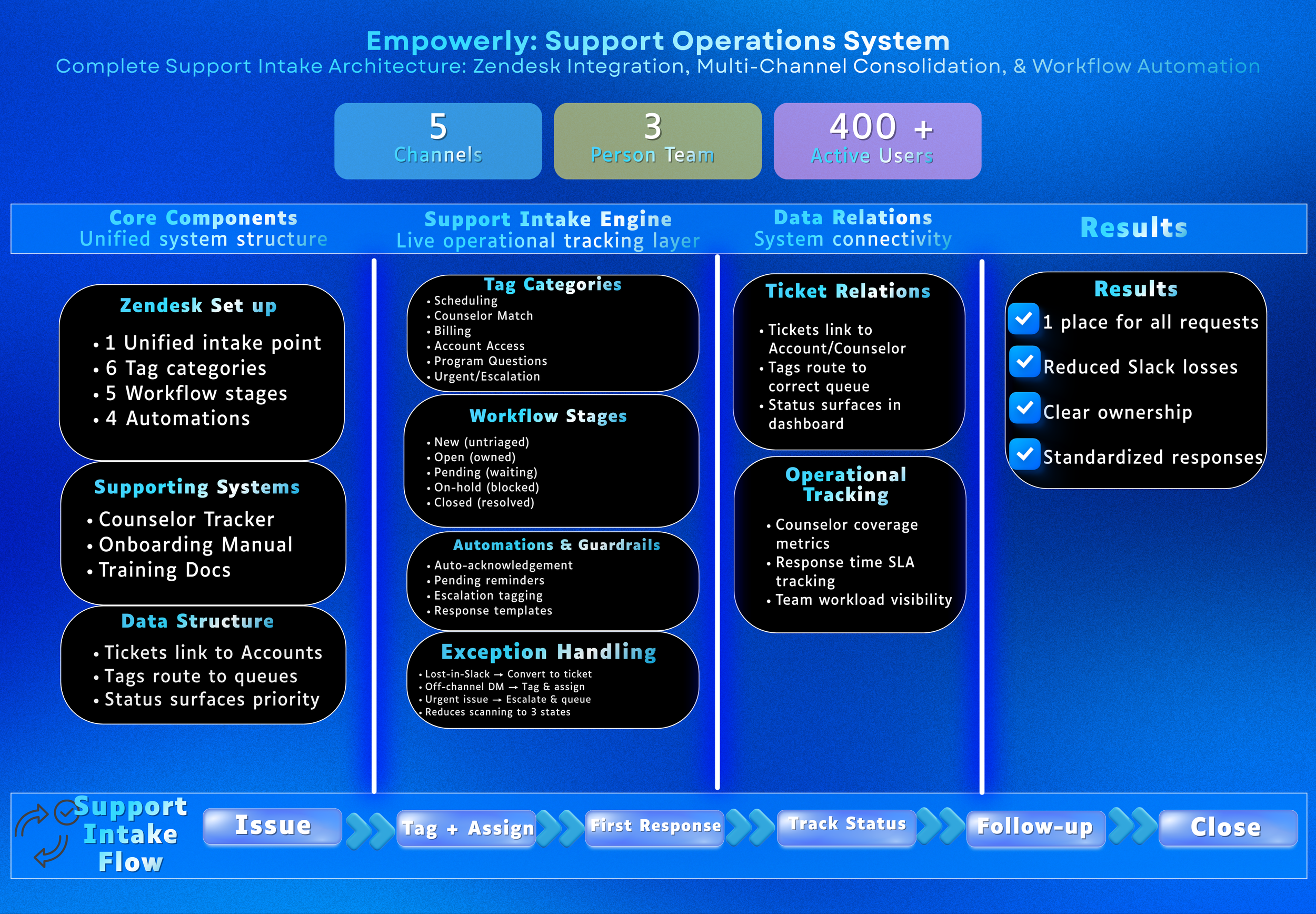
Reworked tags so issues could be categorized consistently (examples of typical categories: scheduling, counselor match/fit, billing, account access, program questions, urgent/escalation).
Established a simple “triage first” rule: every ticket gets tagged + assigned before any deep work starts.
2) Basic workflow stages
A common, workable flow that fits what you described:
New (untriaged)
Open (owned and in progress)
Pending (waiting on customer/counselor)
On-hold (waiting on internal team, policy decision, or engineering)
Solved/Closed
3) Automations + guardrails
These are standard Zendesk mechanics and are believable without being too specific:
Auto-acknowledgement on receipt so the customer knows it’s in the system
“Pending follow-up” reminders when a ticket sits too long without an update
Escalation tagging for urgent issues and a way to surface them in a priority queue
Macros/templates for your most common responses to reduce rewrite time and keep tone consistent
4) Response-time expectations
You mentioned “respond within 24 hours or ASAP.” A realistic policy for your page:
Same-day response when possible
1 business day response expectation as the default
Clear next step in the first reply (what you need from them, when you’ll follow up)
The operational workflow (how work actually moved)
Typical support flow
Issue comes in to Zendesk (or is forwarded/converted into a ticket)
Tag + assign owner (you or the appropriate queue)
First response with next step
Track status: Open, Pending, On-hold
Follow-up cadence until resolved
Close ticket with summary so it’s searchable later
This solved the “where did this go” problem and created a reliable handoff point between CS, Sales, and other internal teams.
Rollout and adoption
This part matters because it shows you can implement, not just design.
Met with Sales to align on routing rules and reduce “support through Sales”
Sent customer-facing guidance so families knew where support should go
Managed an adjustment period while behavior changed (because people don’t stop DM-ing overnight)
Reinforced the new workflow by consistently converting off-channel requests into tickets
Counselor operations systems
Alongside Zendesk, you were also running structure for counselor operations.
Counselor tracker (Google Sheets)
Maintained a shared tracker to monitor counselor status and operations needs
Reported tracker stats in internal meetings (coverage, load, responsiveness, quality signals, onboarding stage)
Onboarding tracking + training manual
Built an onboarding tracker in Sheets/Excel to standardize steps and prevent new hires from slipping through cracks
Created a training manual that documented procedures, tools, and expectations for operations work
Results
Consolidated support intake so issues were trackable and searchable
Reduced “lost in Slack” requests by converting off-channel issues into tickets
Improved ownership clarity: requests had an owner and a status, not just a message thread
Standardized responses and reduced repeat admin work with templates and macros
Created onboarding and counselor ops tracking that improved consistency across a distributed team
Why this matters
I notice operational friction early and fix it before it becomes “just how we do things.”
I build structure people actually follow because it matches how the work really moves day to day.
I reduce noise by making one clear place to go for the truth, instead of five half-systems.
I design for the people doing the work, so there are fewer interruptions, clearer expectations, and smoother handoffs.